AI chatbots
DBestChatBot Is Now an Approved nopCommerce Marketplace Extension
Sep 27, 2026· 3 min read
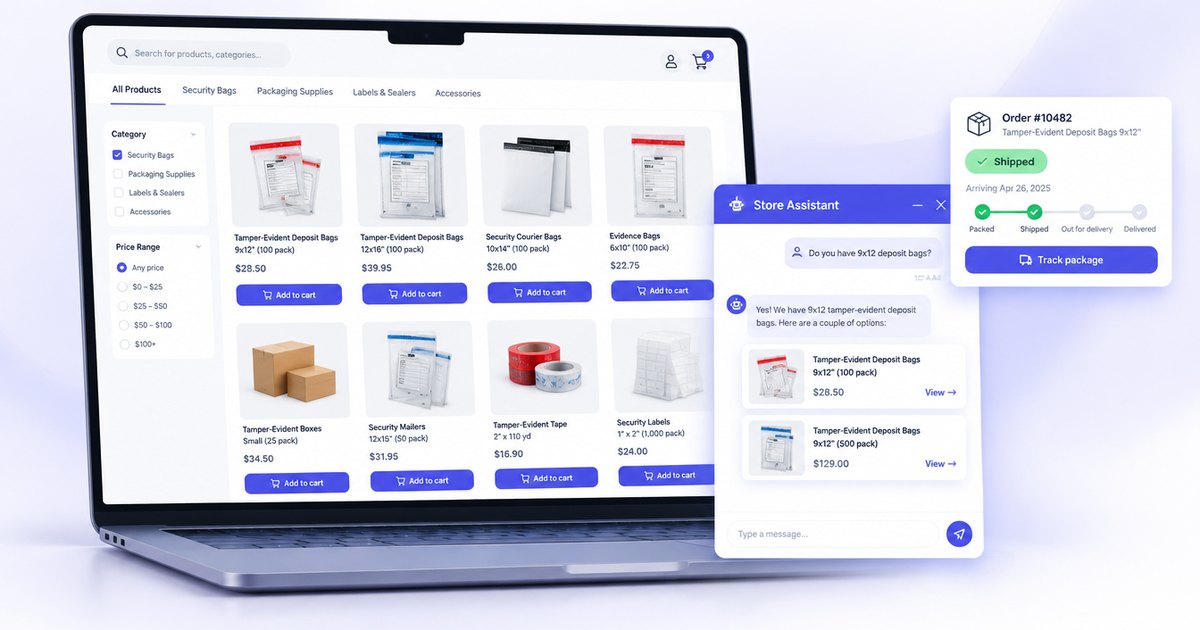
DBestChatBot is now an approved extension on the official nopCommerce Marketplace. The nopCommerce team reviewed the plugin and published it under Customers > Live chat, where any nopCommerce store owner can download it for free.
Quick answer: If you run a nopCommerce store, you can now install DBestChatBot straight from the nopCommerce Marketplace. It adds an AI sales assistant that answers from your live catalog with clickable product cards, shows customers verified order status and tracking, and sends your team the leads it captures.
What the approval means for store owners
A marketplace listing is more than a download link. Every extension goes through a review by the nopCommerce team before it is published, and the listing shows exactly which nopCommerce versions it supports. For you that means one trusted place to find the plugin, read what it does, and get updates.
The listing currently supports nopCommerce 4.50 and 4.90, with a separate build compiled for each version.
What DBestChatBot does on a nopCommerce store
Answers from your real catalog
Shoppers ask in plain language or type a part number, in whatever format they have it. "PK-1014-250", "pk1014250" and "PK 1014 250" all find the same product. The chatbot only recommends published, in-stock products from your store and never invents products or prices.
Clickable product cards
Every product the chatbot recommends appears as a card with the photo, the price and a link to the product page, so a question turns into a visit to the right page in one click. If your catalog is quote-only, prices are hidden automatically.
Order status and tracking without a support ticket
"Where is my order?" is one of the most common questions any store gets. The customer enters their order number and the email on the order, the plugin verifies both against your store, and the chatbot shows the order status, shipping status, dates, carrier and tracking number, with a Track package button for FedEx, UPS, USPS and DHL.
Addresses, prices, line items and payment details are never shown in order answers, and lookups are rate limited.
Lead capture and human takeover
For quote requests, samples and bulk orders, the chatbot collects name, email, phone and company and emails your team. Your team can also join any live conversation and hand it back to the AI when they are done.
Built to keep your store running
Store owners are rightly careful about what they install. The plugin is designed to stay out of the way of your store's normal work:
- Catalog syncing runs in a background schedule task, never inside page requests or admin saves.
- It adds no new database tables to your store.
- The chat widget is added through a standard widget zone, so it works with any theme.
- Settings follow nopCommerce store scoping, so each store in a multi-store setup can use its own chatbot.
- A GDPR option loads the chat only for visitors who accepted the cookie notice.
- Problems are written to System > Log like any other nopCommerce plugin.
How to install it
- Download the extension from the nopCommerce Marketplace listing.
- In your nopCommerce admin, go to Configuration > Local plugins, choose Upload plugin or theme, and upload the zip.
- Find DBestChatBot in the list, click Install, then restart the application when prompted.
- In your DBestChatBot dashboard, open your chatbot, go to Skills > NopCommerce product catalog and click Generate pair code.
- Paste the pair code into the plugin's configuration page in nopCommerce. Your catalog starts syncing in the background.
The plugin itself is free. You need a DBestChatBot account for the AI, and you do not need to manage any AI provider keys.
Try it on your store
If you sell on nopCommerce, especially with a large or technical catalog, this is the fastest way to let shoppers find the right product and check their orders any time of day. See everything the integration does on our nopCommerce page, or create your free account and pair your store in a few minutes.
See a chatbot built for your site in 30 seconds
Paste your URL on /seeitlive and we'll generate a working AI chatbot you can chat with right now — no signup, no credit card.
Try the live demoFrequently asked questions
- Is the DBestChatBot nopCommerce plugin free?
- Yes. The plugin is free on the nopCommerce Marketplace. You need a DBestChatBot account for the AI, and you do not need to manage any AI provider keys.
- Which nopCommerce versions are supported?
- The marketplace listing supports nopCommerce 4.50 and 4.90, with a separate build compiled for each version.
- Can customers track their orders in the chat?
- Yes. The customer enters the order number and the email on the order, the plugin verifies both on your store, and the chatbot shows order status, shipping status, carrier and tracking number with a Track package button.
- Does the plugin add tables to my nopCommerce database?
- No. It adds no new database tables, and catalog syncing runs in a background schedule task rather than inside page requests.
- Will it work with my theme?
- Yes. The chat widget is added through a standard nopCommerce widget zone, so it works with any theme.
Related reading
AI chatbots
Best Chatbot for Salon: Automate Bookings, Capture Leads & Enhance Client Engagement
Find out how the best chatbot for salon can streamline your operations, enhance customer interactions, and drive business growth effortlessly.
Sep 28, 2026 · 4 min read
AI chatbots
Best AI Chatbot for WordPress: Enhance Engagement & Boost Sales
Explore the best AI chatbot for WordPress to enhance website engagement, boost sales, automate support, and capture valuable leads seamlessly.
Sep 27, 2026 · 3 min read
AI chatbots
How to Use AI Chatbot ROI: Increase Efficiency & Boost Sales
Learn how to use AI chatbot ROI to transform your SaaS business by enhancing efficiency, boosting sales, and reducing operational costs.
Sep 25, 2026 · 3 min read