Este artículo solo está disponible en inglés.
AI chatbots
Best NopCommerce Chatbot: Boost Sales, Enhance Support & Capture Leads
Sep 30, 2026· 8 min de lectura
In today's competitive e-commerce landscape, integrating a chatbot into your NopCommerce store can be a game-changer. A good chatbot answers product questions with real products, tracks orders, hands customers their invoices, captures leads, and, since October 2026, shows you which chats turned into orders. But with so many options available, how do you choose the best NopCommerce chatbot?
Quick answer: The best NopCommerce chatbot is a native plugin that reads your live catalog, verifies and tracks orders, shares invoices safely, and proves its value with sales attribution. DBestChatBot for nopCommerce does all of this on nopCommerce 4.50 to 4.90, with no API keys and no new database tables.
Why SMB owners need the best NopCommerce chatbot
Small and mid-sized business (SMB) owners need to leverage every tool at their disposal to stay ahead. The best NopCommerce chatbot can help you:
- Boost sales: Instant answers and real product recommendations keep buyers moving to checkout.
- Enhance customer support: Available 24/7, a chatbot answers order status, invoice and policy questions before your team even sees them.
- Capture leads: Quote requests, sample requests and B2B enquiries are collected conversationally and sent to your inbox.
- Measure it: A dashboard that shows views, chats, leads and orders from chat tells you whether the chatbot is paying for itself.
How NopCommerce chatbots deliver enhanced e-commerce performance
NopCommerce chatbots leverage AI to understand and respond to customer inquiries, offer product recommendations, and provide instant support. The difference between a generic chat widget and a real nopCommerce chatbot is the integration: a plugin that syncs your catalog, verifies orders on your store, and reports results back, so the chatbot works from your data instead of guessing.
Use Case 1: Real-time customer support
In the fast-paced world of e-commerce, customers expect immediate answers. With a NopCommerce chatbot, you provide real-time support, answering FAQs, policy questions and "where is my order" without a ticket. When a question needs a person, the chatbot hands over to your team, who can take the conversation live from the dashboard or from their phone.
Use Case 2: Personalized product recommendations
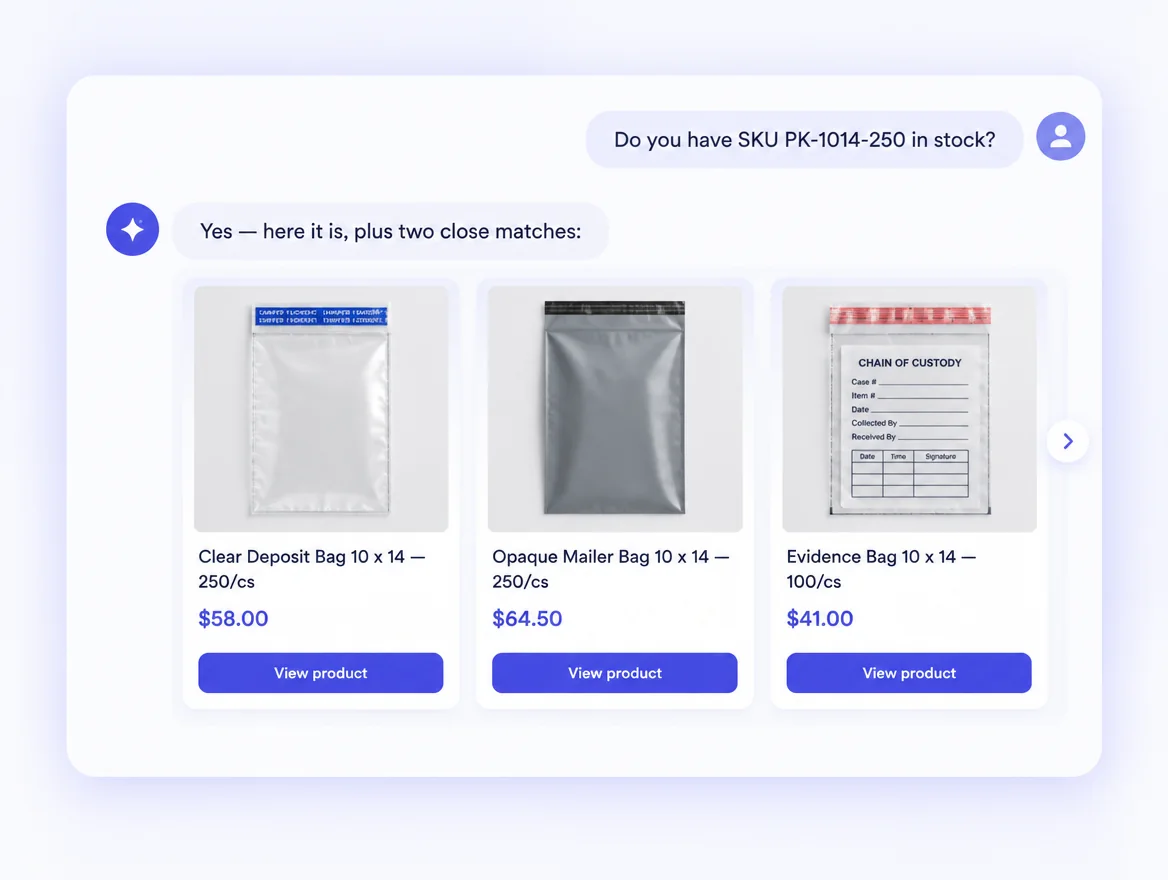
A native plugin syncs your whole catalog (names, SKUs, prices, stock, categories and images) from nopCommerce automatically. Shoppers describe what they need or paste a part number, and the chatbot answers with clickable product cards that link straight to your product pages. Only published, in-stock products are recommended, and price changes reach the chatbot within minutes.
Use Case 3: Seamless order tracking and invoices
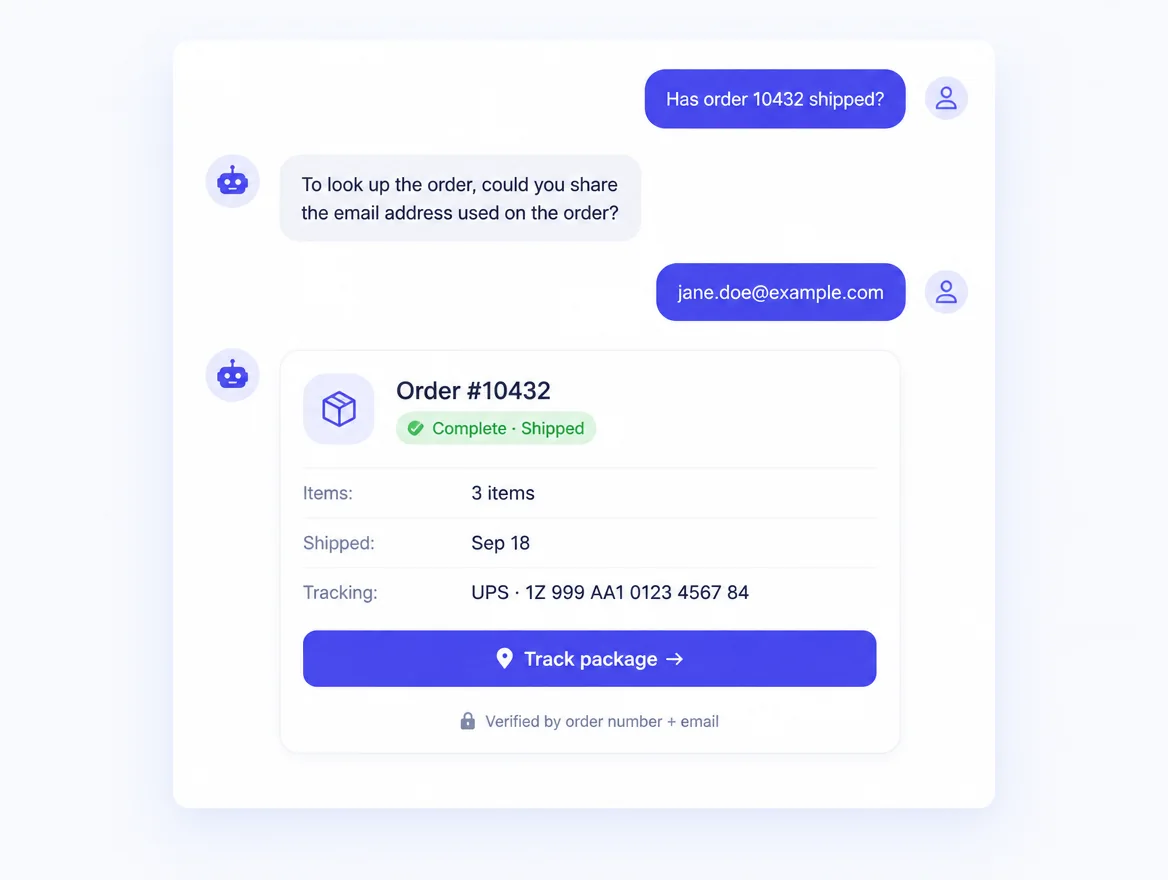
A customer gives the order number and the e-mail on the order. The plugin verifies both on your store (never on a third-party copy of your data) and the chatbot shows a live order card: status, shipping status, dates, tracking number and a Track package button. It never shows addresses, prices or payment details, and it cannot change or cancel orders.
New: invoices in the chat
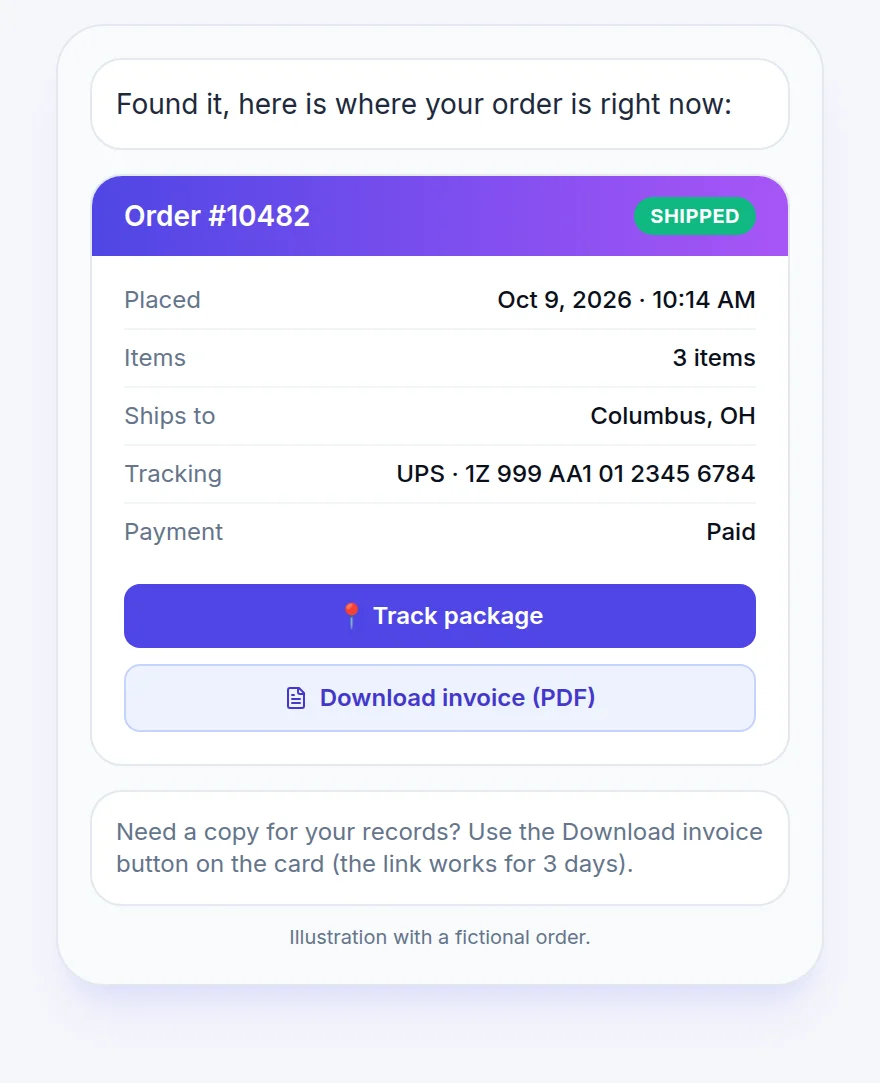
"Can I get my invoice?" is one of the most common support requests in any store, and it used to mean a ticket, a search in admin and an e-mail. From plugin 2.1.1 the chatbot handles it: once the customer has verified the order (same order number plus e-mail check), the order card shows a Download invoice (PDF) button. The file is your store's own nopCommerce invoice, the same document you would print from Admin, Orders, PDF invoice. Links are signed and expire after 72 hours, and nothing is shared without a matching e-mail.
Use Case 4: Efficient lead capture
By engaging visitors with personalized messages, chatbots capture leads and qualify them for follow-up. The best ones do it conversationally, one question at a time, instead of blocking the chat behind a form. Name, e-mail, phone, company and the request itself land in your dashboard and inbox, and the chatbot keeps helping while it collects them.
New: see which chats turned into orders
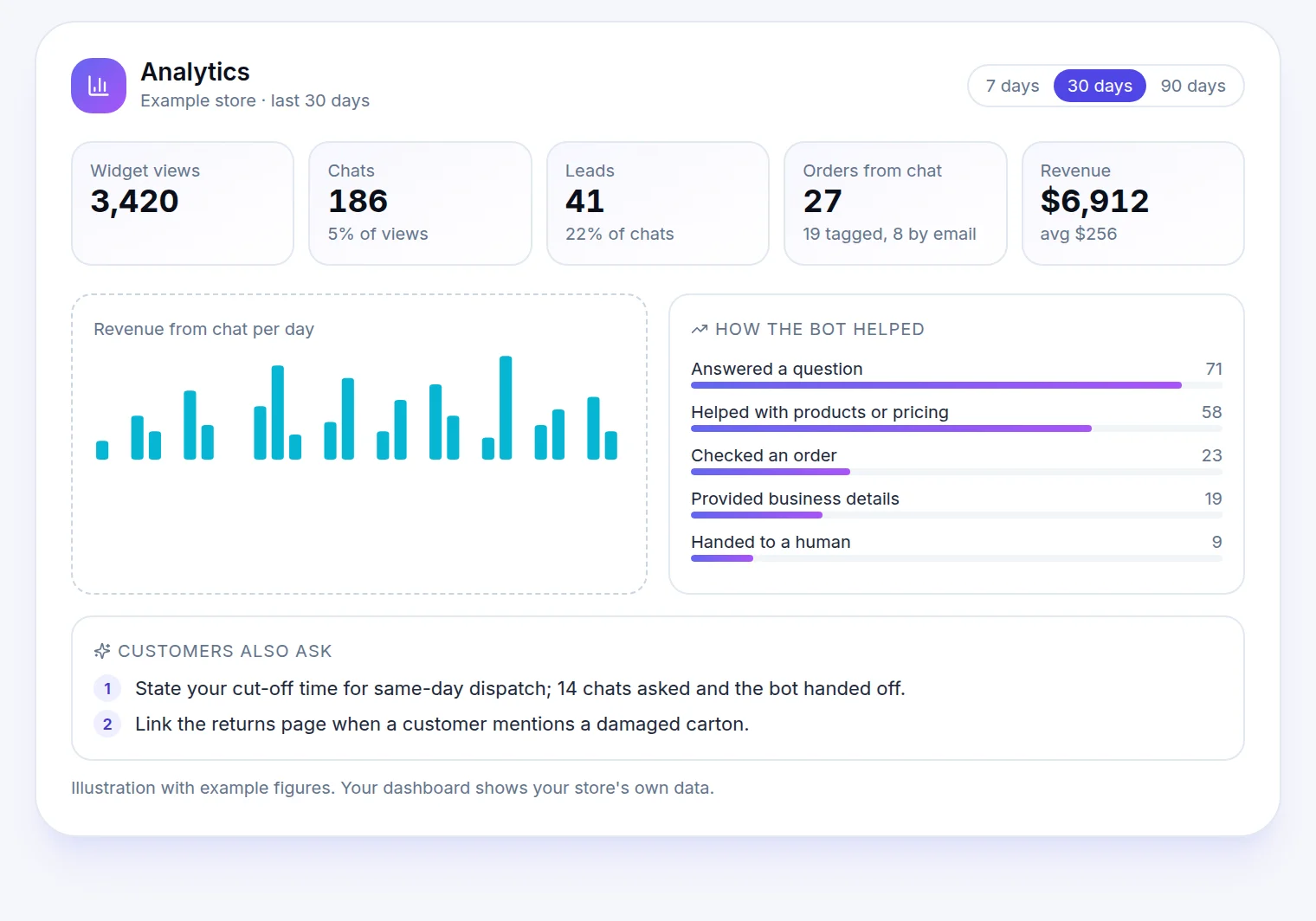
Most chatbot vendors show you chat counts. That is not the question a store owner asks. The question is: did the chatbot sell anything?
DBestChatBot's nopCommerce plugin now answers it. When a shopper chats and then places an order, the plugin reads the chat's cookie at checkout and reports the order to your dashboard. Orders are also matched when the e-mail a customer gave in chat appears on an order within the next 30 days. Chats from your own staff domains and high-volume house accounts are excluded, so the figure is one you can repeat to your accountant.
The dashboard shows, for any 7, 30 or 90 day range:
- Widget views, chats and leads, with the share of views that start a chat.
- Orders from chat and revenue, split by how they were matched.
- How the bot helped: answered a question, provided business details, directed to the right place, checked an order, captured contact details, handed to a human, could not help. Click any number to see the exact chats behind it.
- Customers also ask: the top topics from your real conversations plus concrete suggestions for your chatbot's instructions, written from the chats where the bot fell short.
- A one-click PDF export of the whole section, for the owner or the client who does not log in.
Manage chats from your phone
The DBestChatBot dashboard is also an app. The Android app is on Google Play, with the iPhone version in review. You get a notification when a visitor starts a chat and can take over the conversation from wherever you are, then hand it back to the AI.
Best features to look for in a NopCommerce chatbot
- Catalog-aware answers: Recommends real products from your live catalog, not generic text.
- Verified order lookup and invoices: Order number plus e-mail, then status, tracking and the invoice PDF.
- Sales attribution: Reports which chats led to orders, with revenue, on your dashboard.
- Conversational lead capture: Collects details without a form.
- Human handover: Your team can step in live, from the web or a phone app.
- Safe install: One DLL, no new database tables, one-step rollback, a build compiled for your exact nopCommerce version.
- Privacy built in: GDPR cookie-consent gate, signed requests between store and service, and a strict whitelist for order data.
FAQs about NopCommerce chatbots
How much does a NopCommerce chatbot typically cost?
Prices vary depending on the features, but basic plans can start around $30/month. DBestChatBot's nopCommerce plugin itself is free and includes a 20-chat trial.
Can I integrate a chatbot with my existing NopCommerce store?
Yes. DBestChatBot ships one package per nopCommerce line (4.50 to 4.90). Upload it under Configuration, Local plugins, click Install, restart, and pair it with your chatbot using a one-time code. Catalog sync starts the moment you connect.
Can the chatbot send invoices?
Yes, from plugin 2.1.1. After the customer verifies the order with the order number and the e-mail on the order, the chat shows a Download invoice (PDF) button with your store's own invoice. The link is signed and expires after 72 hours.
Can I see which sales came from the chatbot?
Yes. Orders placed after a chat are reported to your dashboard, either because the plugin saw the chat's cookie at checkout or because the e-mail given in chat matches the order within 30 days. You see orders, revenue, and the chats behind every number.
How do chatbots improve customer support?
They offer 24/7 availability, quick responses, and automate repetitive tasks such as order status, invoice requests and policy questions, improving overall efficiency.
Are chatbots customizable?
Yes, most platforms allow you to customize the chatbot's responses and appearance to match your brand.
What are the security features of a NopCommerce chatbot?
Look for signed requests between the store and the service, verification before any order data is shown, no raw customer data in prompts, and a plugin that creates no database tables and can be removed in one step.
Can a NopCommerce chatbot handle multiple languages?
Yes. AI chatbots answer in the language the visitor writes in, and the product catalog and order data stay the same underneath.
Getting started with the best NopCommerce chatbot
Check your nopCommerce version under Admin, System, System information, then download the matching DBestChatBot package and follow the five-step install on the nopCommerce plugin page. Already on 2.0? Upload the new zip, click Update, restart, and your settings and pairing are kept; 2.1.1 adds sales attribution and invoices in chat.
Mira un chatbot creado para tu sitio en 30 segundos
Pega tu URL en /seeitlive y generaremos un chatbot de IA funcional con el que puedes chatear ahora mismo: sin registro, sin tarjeta de crédito.
Try the live demoPreguntas frecuentes
- How much does a NopCommerce chatbot typically cost?
- Prices vary depending on the features, but basic plans can start around $30/month. DBestChatBot's nopCommerce plugin itself is free and includes a 20-chat trial.
- Can I integrate a chatbot with my existing NopCommerce store?
- Yes. DBestChatBot ships one package per nopCommerce line (4.50 to 4.90). Upload it under Configuration, Local plugins, click Install, restart, and pair it with your chatbot using a one-time code.
- ¿Puede el chatbot enviar facturas?
- Yes, from plugin 2.1.1. After the customer verifies the order with the order number and the e-mail on the order, the chat shows a Download invoice (PDF) button with the store's own invoice. The link is signed and expires after 72 hours.
- Can I see which sales came from the chatbot?
- Yes. Orders placed after a chat are reported to the dashboard, matched by the chat cookie at checkout or by the e-mail given in chat within 30 days, with revenue and the chats behind every number.
- How do chatbots improve customer support?
- They offer 24/7 availability, quick responses, and automate repetitive tasks such as order status, invoice requests and policy questions.
- Are chatbots customizable?
- Yes, most platforms allow you to customize the chatbot's responses and appearance to match your brand.
- What are the security features of a NopCommerce chatbot?
- Signed requests between the store and the service, verification before any order data is shown, no raw customer data in prompts, and a plugin that creates no database tables and can be removed in one step.
- Can a NopCommerce chatbot handle multiple languages?
- Yes. AI chatbots answer in the language the visitor writes in, while the catalog and order data stay the same underneath.
Lecturas relacionadas
AI chatbots
Conversational AI ROI: Boost Revenue, Cut Costs & Enhance CX
Explore how conversational AI ROI can drive revenue growth, reduce operational costs, and improve customer experience for SaaS founders.
Nov 8, 2026 · 4 min de lectura
AI chatbots
How to Use Shopify Chatbot: Boost Sales & Enhance Support
Learn how to use Shopify chatbot to optimize your online store. Boost sales, automate support, and increase customer satisfaction with AI technology.
Nov 5, 2026 · 4 min de lectura
AI chatbots
Best Shopify Chatbot App: Enhance Support, Boost Sales & Automate Tasks
Explore the top Shopify chatbot apps to enhance your e-commerce store, boost sales, automate tasks, and improve customer engagement effortlessly.
Oct 25, 2026 · 3 min de lectura